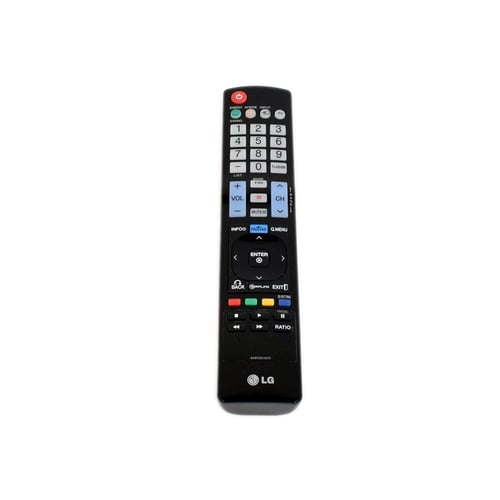
Find genuine LG TV remote controls for compatible LG televisions at LGParts.com. Shop replacement remotes for LG TVs, including standard television remote controllers and compatible Magic...
Read More
Find genuine LG TV remote controls for compatible LG televisions at LGParts.com. Shop replacement remotes for LG TVs, including standard television remote controllers and compatible Magic Smart TV remotes. Whether your original remote is lost, damaged, unresponsive, or needs replacement, start with your LG TV model number or the part number printed on the original remote. Browse the LG TV remote controls below to find a compatible replacement for your television.
The LG Television Remote Control - AKB72914273 is the correct replacement for the following model numbers.
Does this part fit my model?
Does this part fit my model?
No, This Part Does Not Fits in This Model
share :
Hurry, only parts left in stock
Keep in touch with us
Product Information
Take control of your TV viewing experience with the LG AKB72914273 Television Remote Control. This sleek and ergonomic remote puts the power in your hands, allowing you to effortlessly navigate through your favorite shows and movies with ease. Say goodbye to endless scrolling and hello to convenience at your fingertips.
With the LG AKB72914273 remote, you can enjoy a seamless viewing experience from the comfort of your couch. Its user-friendly design makes it easy to adjust settings, change channels, and access all the features of your LG television. Say goodbye to lost remotes and hello to uninterrupted entertainment.
Upgrade your TV setup with the LG AKB72914273 Television Remote Control – the perfect companion for your LG TV. Say goodbye to complicated controls and hello to simplicity. Get yours today and take full control of your viewing experience with just the click of a button.
The LG Television Remote Control - AKB72914273 is the correct replacement for the following model numbers.
Take control of your TV viewing experience with the LG AKB72914273 Television Remote Control. This sleek and ergonomic remote puts the power in your hands, allowing you to effortlessly navigate through your favorite shows and movies with ease. Say goodbye to endless scrolling and hello to convenience at your fingertips.
With the LG AKB72914273 remote, you can enjoy a seamless viewing experience from the comfort of your couch. Its user-friendly design makes it easy to adjust settings, change channels, and access all the features of your LG television. Say goodbye to lost remotes and hello to uninterrupted entertainment.
Upgrade your TV setup with the LG AKB72914273 Television Remote Control – the perfect companion for your LG TV. Say goodbye to complicated controls and hello to simplicity. Get yours today and take full control of your viewing experience with just the click of a button.